Nodes and modules
One Mutara install can run more than one module. A module is an AllStar node, a YSF module, a DMR module or an M17 module. Each module has its own page, settings and clips. The modules share one computer, one IAX port and one set of accounts.
Types of module #
- AllStar node. A node with its own node number, AllStar links and IAX users. The first module is the node that you set up on Get started. Only the first module can have a radio.
- YSF. A client of a YSF (System Fusion) reflector. Users listen and talk on the page of the module. An AllStar node of the same install can also link to it. The module needs a transcoder server for the voice. Read Use a YSF module.
- DMR. A hotspot login to a DMR network. It listens to one talkgroup on one timeslot. When an admin turns on talk, users who may talk also talk on the talkgroup. An AllStar node of the same install can link to it and hear the talkgroup. The module needs a transcoder server for the voice. Read Use a DMR module.
- M17. A client of one module of an M17 reflector. It listens to the reflector module. When an admin turns on talk, users who may talk also talk on it. An AllStar node of the same install can link to it. The module needs a transcoder server for the voice. Read Use an M17 module.
- Room. A push-to-talk room for the users of this install. It is never on the air: the nodes, the radio and the links do not hear it. Nothing links to a room. Read Use the chat and a room.
- P25. This type comes later. Settings shows it as Coming later.
The pages name each module by its ID and its type, for example 2100 (AllStar), ysf-club (YSF), dmr-3100 (DMR), m17-club (M17) or net-team (Room). The ID is the node number of an AllStar node, and the file name of a YSF, DMR, M17 or room module. The callsign and the name come after the ID.
Change to a different module #
With more than one module, the module bar shows below the top bar of the dashboard.

- The module of the page is first, with an outline.
- The other modules come after it. The module with the newest activity comes first.
- A green dot shows a module that is active now.
- Each button shows the ID and a type pill, for example ysf-club YSF.
- All nodes is the last button.
- Click a module in the module bar.
Result: The dashboard of that module opens. It shows the talker, clips, Last heard and Activity of that module only.
When you listen, you continue to listen. The audio changes to the new module, and you do not click Listen again. Your volume and voice boost stay the same.
Caution: When you talk and change to a different module, your transmission stops. Push the talk button again to talk on the new module. Open mic does not start by itself when you go into a room.
When you listen and click All nodes, you continue to listen to the same module. The dashboard shows all the modules, and the top card says You hear and the name of that module. In the Nodes list, that module has the mark You hear this node. In the module bar, that module has a small speaker icon.
- The talk button, open mic and the DTMF keypad are not on All nodes. To talk, click a module.
- Click a module in the Nodes list or in the module bar. The audio goes to that module, and its dashboard opens.
- The browser Back and Forward buttons go between All nodes and the modules. You continue to listen.
- Below the Nodes list, Scan priorities opens the scan priorities, as on the All nodes page.
Caution: When you talk and click All nodes, your transmission stops. Open mic and Interrupt also stop. You continue to listen.
When you do not listen, All nodes opens the All nodes page. Read The All nodes page.
On a phone, swipe the module bar to see more modules.
The All nodes page #
The All nodes page is for the whole install. With more than one module, it opens after you sign in. To open it from a dashboard, click All nodes in the module bar. The page has its own Sign in and Sign out buttons at the top.
When you listen, All nodes shows the same parts in the dashboard, and the audio continues. Read Change to a different module.
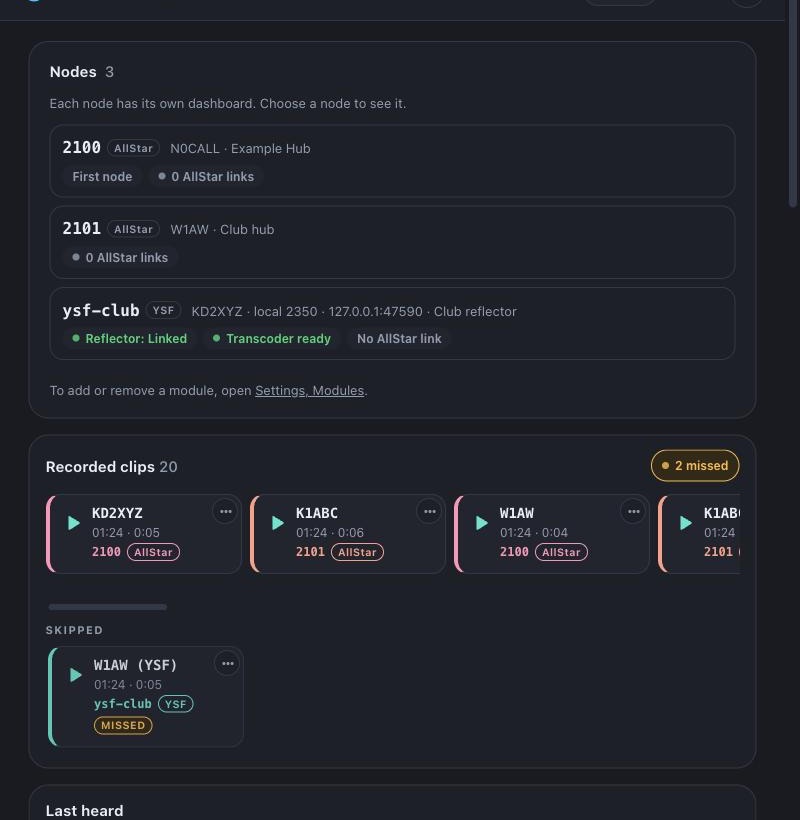
The page has these parts:
- Nodes. Each module with its ID, type, callsign, name and status. A YSF module also shows the reflector, the link state and the transcoder state. Click a module to open its dashboard.
- Recorded clips. The clips of all the modules that you can listen to, newest first. Each clip shows its module ID and type pill, with a color for each module. The color is not the only sign.
- Missed and Skipped. After a scan, a clip that the scan did not play has a Missed mark. Read Find the clips that you missed.
- Last heard. One row for each callsign, with its latest module, time and length.
- Activity. The events of all the modules. Each event names its module.
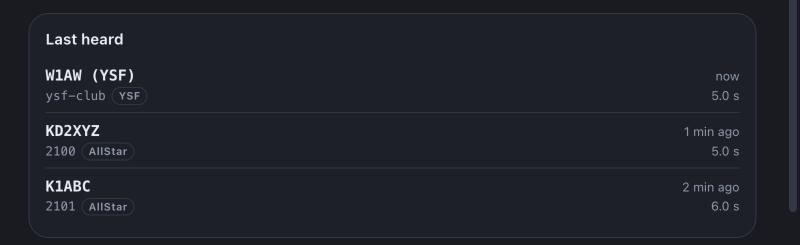
To hear all your modules on one connection, click Scan. Read Scan.
Add a module #
You must be an admin.
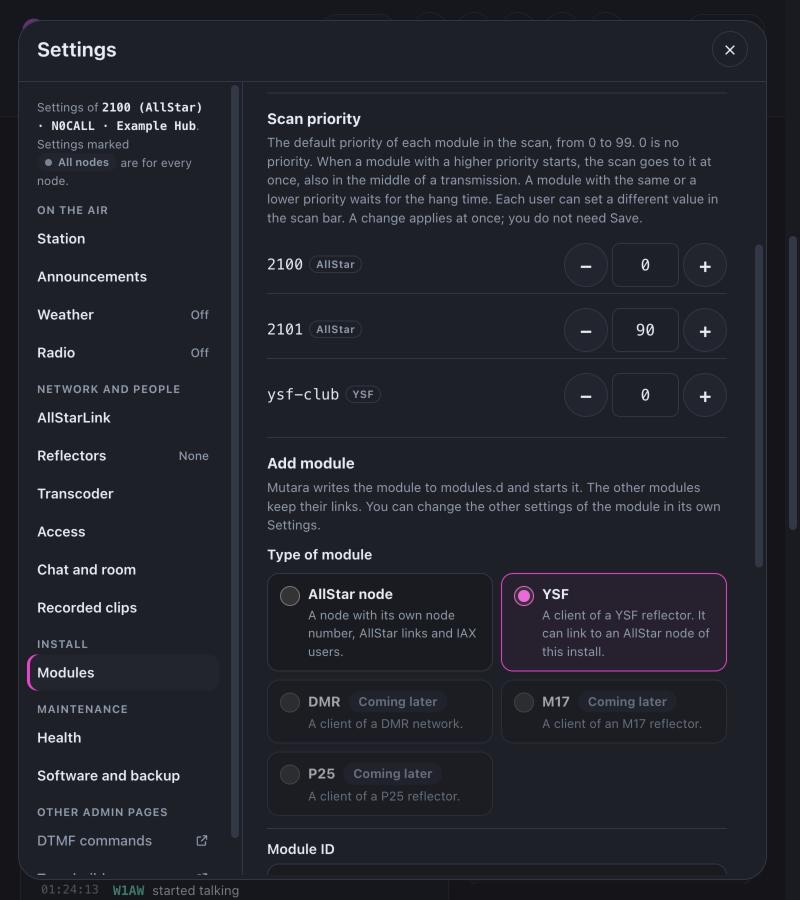
- Open Settings, then Modules. The All nodes page has a link to this page.
- Under Add module, select the type of module: AllStar node, YSF, DMR, M17 or Room. The fields of that type show.
- For an AllStar node, type the Node number, for example 2101, the Callsign and the Node name. To register the node, type the Node password and turn on Register with AllStarLink.
- For a YSF module, type the Module ID, for example ysf-club, the Reflector (host and UDP port), the Local number, for example 2350, the Callsign and the Name. If you want, select an AllStar node in Link to AllStar node.
- For a DMR module, type the Module ID, for example dmr-3100, the Master (host and UDP port), the Hotspot password, your DMR ID, the ESSID, the Timeslot, the Talkgroup and the Local number, for example 2351. If you want, select an AllStar node in Link to AllStar node. Read Use a DMR module first: the talkgroup must be static at your network.
- For an M17 module, type the Module ID, for example m17-club, the Reflector host, for example m17.example.net, the Port (empty is 17000), the Reflector module, for example A, the Local number and the Callsign. If you want, set a Link callsign, turn on Talk on the reflector and select an AllStar node in Link to AllStar node.
- For a room, type the Room ID, for example net-team, and the Name. Signed-in users listen in the room, and users who can talk on a node talk there. Change this later on the Room page of its settings.
- Click Add AllStar node, Add YSF module, Add DMR module, Add M17 module or Add room.
Result: Mutara writes the file of the module in modules.d and starts the module. The other modules do not restart and keep their links. You do not need Save.
If you keep the callsign empty, the module uses the callsign of the first module.
Remove a module #
- Open Settings, then Modules.
- Under Modules of this install, click Remove next to the module.
- Click Remove module to confirm.
Result: Mutara deletes the file of the module in modules.d and stops the module. Its links drop. The other modules continue.
Mutara keeps the data of the module. It moves the state folder of the module (clips, chat and favorites) to modules/.removed and deletes nothing in it.
You cannot remove the first module. It shows First module.
Use a YSF module #
A YSF module links to one YSF reflector. Open the page of the module from the module bar. The page has the same Listen and talk controls as the page of a node. It has no keypad and no links card. A card shows the reflector, the local number, the transcoder state, the talker from the reflector and the local talker.
Your voice goes to the reflector under the callsign of your account. If your account has no callsign, the reflector shows the callsign of the module.
The reflector is half duplex
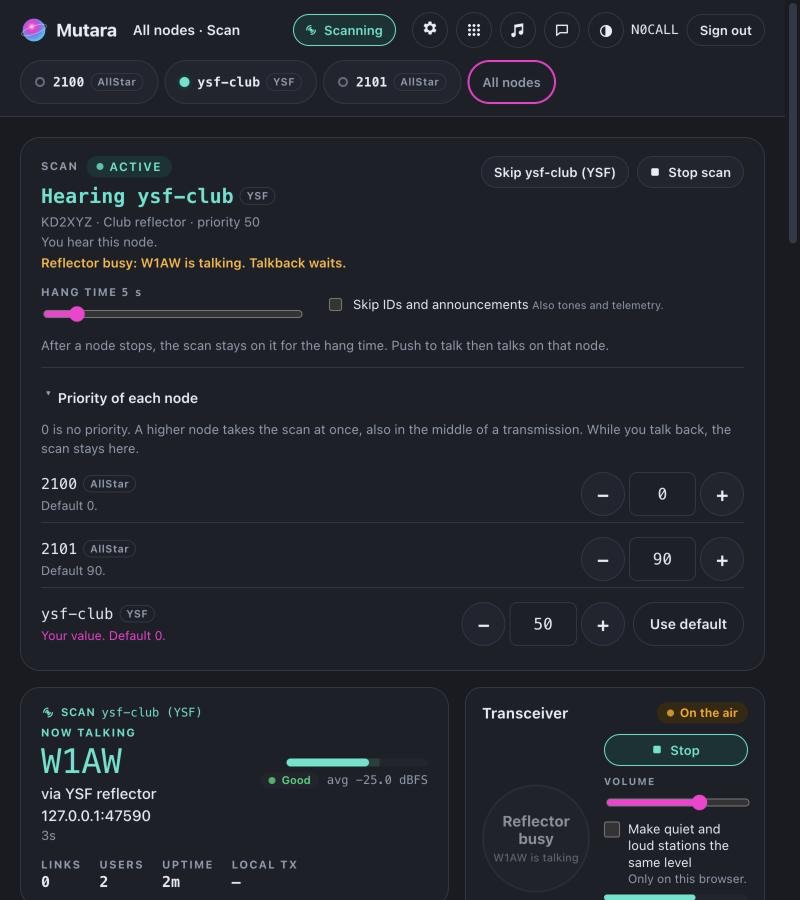
The reflector takes one talker at a time. While a station on the reflector talks, and for 1 second after, the reflector is busy:
- The talk button shows Reflector busy and the callsign of the talker. You cannot talk.
- When the scan plays the module, the scan bar shows "Reflector busy: W1AW is talking. Talkback waits."
- Audio from a linked AllStar node that starts while the reflector is busy does not go to the reflector. The users and the node still hear it.
Only the lane into the reflector is half duplex. The AllStar node stays full duplex. Its radio, its links and the link to the module hear each other at all times.
The reflector also takes one local talker at a time: the first who starts. A second local talker does not go to the reflector until the first stops.
Audio levels
The module levels the audio from the reflector before you hear it, and your audio before it goes to the reflector. Auto level brings speech to an average of −25 dBFS. A limiter keeps the peaks below −6 dBFS. Auto level turns quiet audio up by 18 dB at most, so that the hiss of a weak signal does not come up.
Your audio goes into the vocoder at a fixed level by default: TX AGC is off, and the vocoder level is −9 dB from the AllStar level of −25 dBFS. So about −34 dBFS goes into the vocoder. This suits most radios. Hotter audio sounds distorted on air. After you stop talking, the activity line shows the level into the vocoder, for example vocoder avg −34.0 dBFS · peak −16.2 dBFS. This is information only.
Only an admin can change the levels. Open Settings on the page of the module, then YSF reflector, Audio levels:
- Auto level from the reflector. When it is off, a fixed Receive gain from −12 to +24 dB applies.
- Transmit auto level (AGC) to the reflector (off by default) and Vocoder level, from −12 to +24 dB. The default is −9 dB. Turn TX AGC on only if a reflector needs it.
- Maximum auto level boost, from 0 to 30 dB. The default is 18 dB.
A change applies at once. The page of the module and Settings, Health show the level of the last transmission from the reflector: as it came, and after the module levelled it.
Clips of a YSF module
The module can record clips, as a node does. A clip from the reflector has the callsign of the YSF talker, for example W1AW (YSF).
The transcoder server
YSF and DMR voice use the AMBE+2 codec. Mutara does not have this codec. A transcoder server (tcdpool) converts the voice. The source of the transcoder server and its build and setup steps are in the mutara-radio/tcdpool project on GitHub. If you use the server of someone else, the operator of the server gives you an address and a key. An admin types them in Settings, Transcoder. Without the server, the module stays linked to the reflector, but no voice goes through.
For a signed-in user, the card of the module also shows the status of the server, for example Transcoder server: busy, 6 of 8 processes, and the sessions of the key, for example 2 of 4. Mutara reads it each 30 s. Settings > Health shows the same, with more detail.
Use a DMR module #
Note: A DMR module listens only until an admin turns on talk. Mutara is tested with BrandMeister only. Other masters that use the MMDVM Homebrew protocol may work.
A DMR module logs in to one DMR master as a hotspot and listens to one talkgroup on one timeslot. Open the page of the module from the module bar. The page has the Listen control. With talk off, the talk button is off and shows Listen only. A card shows the talkgroup and timeslot, the master, the login ID, the local number, the transcoder state, the talker and the receive level.
Make the talkgroup static first
The master sends a talkgroup to a hotspot only when the talkgroup is static on that hotspot. Mutara makes no dynamic links. With talk off, the module never keys up.
- Find the login ID of the module: your DMR ID × 100 + the ESSID. For DMR ID 3100001 and ESSID 1, the login ID is 310000101.
- At your network, make the talkgroup static for this login ID, on the timeslot of the module. On BrandMeister, do this in SelfCare: open the hotspot of the login ID and add the talkgroup as a static talkgroup.
- Add the module in Settings, Modules. Use the same DMR ID, ESSID, timeslot and talkgroup.
Result: The module logs in and the page shows Linked. When a station talks on the talkgroup, the page shows it, for example DMR 3100002.
If you do not make the talkgroup static, the module logs in and hears nothing. When you change the talkgroup in Settings, also change the static talkgroup at your network. Only that module restarts.
What the module hears
- Only group calls to the talkgroup on the timeslot. The module drops all other traffic: other talkgroups, the other timeslot, private calls and data. Settings, Health counts each kind.
- One call at a time. A second call waits until the first one ends.
- The talker shows as DMR and the DMR ID, for example DMR 3100002, on the page, in Last heard, in the clips and in the scan. With the DMR ID list on, the talker shows with the callsign and the first name, for example W1AW John (DMR). Read Show the names of DMR talkers.
- A linked AllStar node hears the talkgroup. The talkgroup hears the node only with talk on and the link in transceive mode.
Show the names of DMR talkers
The DMR ID list gives the callsign and the first name of each DMR ID. It is off by default.
- Open Settings on the page of a DMR module, then DMR talkgroup.
- Under Talker names, turn on Download the DMR ID list.
- Click Save and restart.
Result: The node downloads the RadioID.net list, and then checks it each day. Activity shows W1AW John (3100001), and Last heard and the clips show W1AW John (DMR). The list is for all the DMR modules of the install. An ID that is not in the list still shows as DMR 3100001.
Talk on the talkgroup
An admin turns on talk in Settings, the page of the module, Talk on the talkgroup. A change restarts only that module. Then:
- A signed-in user with the right to transmit talks with PTT on the page, on the scan and in the apps. A user who may only listen cannot talk.
- Each call shows a DMR ID. To use your own DMR ID, click your user name at the top of the dashboard (on a phone: More, Your profile), type the 7 digits and click Save. The ID applies the next time you click Listen. With no DMR ID, your calls show the DMR ID of the module. Set only a DMR ID that is yours.
- One local talker at a time. While a call comes from the talkgroup, PTT waits and shows Talkgroup busy.
- A call ends when you release PTT, after 500 ms with no audio, or after the TX time limit (3 minutes by default).
- Mutara does not send a talker alias. Radios show the DMR ID.
The hotspot password is a secret. Mutara writes it in the file of the module, which only the owner can read, and never shows it. Each DMR module needs its own login ID: for more talkgroups, add more modules, each with its own ESSID. The callsign of the module must be the callsign of the owner of the DMR ID.
The audio levels, the clips and the transcoder server are as on a YSF module. Read Audio levels and The transcoder server.
Use an M17 module #
Note: An M17 module listens only until an admin turns on talk. Mutara is tested against a test reflector only. It uses the protocol of urfd. Other reflectors may work.
An M17 module links to one module (A to Z) of an M17 reflector, as a hotspot does. Open the page of the module from the module bar. The page has the Listen control. With talk off, the talk button is off and shows Listen only. A card shows the reflector and module, the link callsign, the local number, the transcoder state, the talker and the receive level.
M17 needs no login, no password and no ID list. To add the module, open Settings, Modules, choose M17 and type the host of the reflector (for example m17.example.net), the port (empty is 17000) and the reflector module letter.
The link callsign
- The module links with its callsign, filled with spaces to 8 characters, and the reflector module letter. For example, N0CALL on module A links as N0CALL A.
- The callsign of the module can have 8 characters at most. For a longer callsign, set Link callsign (up to 9 characters).
- Two M17 modules of one install on the same reflector need different link callsigns. Use different reflector modules, or set Link callsign.
What the module hears
- One stream at a time. A second stream waits until the first one ends.
- The talker shows with the base callsign, for example W1AW (M17), on the page, in Last heard, in the clips and in the scan. The card shows the full source callsign.
- The module does not play Codec2 1600 streams, encrypted streams or packet data. Settings, Health counts each kind.
- A linked AllStar node hears the reflector. The reflector hears the node only with talk on and the link in transceive mode.
Known issue: On a urfd reflector, urfd can drop a stream from an M17 client that sends the destination M17-<reflector> <module> in place of @ALL, for example the QSO One app. The module then does not hear that client. A fix for urfd is in progress. Your streams to the reflector are not affected.
Talk on the reflector
An admin turns on talk in Settings, the page of the module, Talk on the reflector. A change restarts only that module. Then:
- A signed-in user with the right to transmit talks with PTT on the page, on the scan and in the apps. A user who may only listen cannot talk.
- Each stream shows a source callsign. To set your own, click your user name at the top of the dashboard (on a phone: More, Your profile), type your M17 callsign, for example W1AW-7, and click Save. It applies the next time you click Listen. With no M17 callsign, your streams show the callsign of your account, else the callsign of the module. Set only a callsign that is yours.
- One local talker at a time. While a stream comes from the reflector, PTT waits and shows Reflector busy.
- A stream ends when you release PTT, after 500 ms with no audio, or after the TX time limit (3 minutes by default).
- Mutara sends no text or position data to the reflector.
When the reflector refuses the link, the module waits 5 minutes before it tries again. The card shows Link refused and the time of the next link.
The audio levels, the clips and the transcoder server are as on a YSF module. M17 uses the Codec2 3200 codec, which the transcoder server also converts. Read Audio levels and The transcoder server.
Link the modules of one install #
The modules of one install link to each other inside Mutara, with no network. Use the same commands and buttons as for other nodes.
Text version of figure 1
- One Mutara install runs node 2100, node 2101 and the YSF module ysf-club.
- Node 2100 has the radio.
- A local link joins node 2100 and node 2101, inside Mutara.
- A local link joins node 2100 and ysf-club. The local number of ysf-club is 2350.
- Node 2101 links to AllStarLink node 2200 over the internet.
- ysf-club links to a YSF reflector.
- On node 2100, send *32101, or type 2101 in the node box and click Link.
Result: The two dashboards show the link as a local link. Each dashboard shows the name of the talker on the other node.
To link node 2100 to a YSF module, use its local number: send *32350. Send *12350 to drop the link. A YSF module links to one AllStar node at a time.
A local link has the usual modes and can be permanent. The loop checks also include local links. A local link does not go in the link lists that the node sends to the AllStar network.
Restart one module #
When you save the settings of one module, only that module restarts. Its links and app calls stay connected. A change for the whole install, such as the accounts, the web address or the transcoder server, restarts all of Mutara.
If a module has an internal error, it stops alone. All nodes and its dashboard show Stopped: internal error. The other modules continue.
- On the All nodes page or view, or on the dashboard of the module, click Restart this node. Only an admin sees this button.
Result: Only that module restarts. Its permanent links come back.
Give a user some modules only #
An admin gives each group and account its rights on each module. A user sees only the modules that it may view, in the module bar, on the All nodes page and in the scan. If the user has no module of this install, the dashboard says "Your account has no nodes on this install. Ask the admin." An admin can always use all modules. Read Who may do what on a node.